TJCTF — rev/polaroid
Reverse engineering writeup for TJCTF polaroid: recovering a hardcoded password from ARM64 byte-by-byte comparisons, XOR-decrypting an embedded PNG, and rotating the inverted image to reveal the flag.
Category: Reverse Engineering | Binary: Mach-O 64-bit ARM64 | Flag: tjctf{develop_the_picture}
Executive Summary
The challenge provided a small ARM64 Mach-O executable that refuses to develop an embedded image unless the correct password is supplied. Static analysis showed that the program verifies the password byte-by-byte, then XOR-decrypts an embedded blob into flag.png. The decoded image was inverted, so rotating it 180 degrees revealed the final flag.
| Field | Value |
|---|---|
| Binary Type | Mach-O 64-bit ARM64 executable |
| Recovered Password | exposeTheNegative |
| Flag | tjctf{develop_the_picture} |
Step 1 — Initial Triage
Basic inspection identified the file format and useful strings. The executable references flag.png, asks for a password, and prints a success message after writing the decoded image.
$ file polaroid
polaroid: Mach-O 64-bit arm64 executable, flags:<NOUNDEFS|DYLDLINK|TWOLEVEL|PIE>

$ strings -n 5 polaroid
usage: %s <password>
flag.png
developed flag.png
Step 2 — Password Recovery
Disassembling main showed an argument count check, followed by a length check against 0x11 bytes. The password was then compared one byte at a time against immediate ASCII values. Reading the constants in order produced the required password:
| Check | Recovered Value |
|---|---|
| Length | 17 bytes |
| Password | exposeTheNegative |
Step 3 — Decryption Logic
After the password succeeds, the program opens flag.png and loops over an embedded encrypted array. The loop uses the password as a repeating XOR key. In the disassembly, the encrypted data begins near 0x720 and the loop count is 0x18b4 bytes.
password = b"exposeTheNegative"
encrypted_offset = 0x720
encrypted_size   = 0x18b4

with open("polaroid", "rb") as f:
    f.seek(encrypted_offset)
    encrypted = f.read(encrypted_size)

plain = bytes(byte ^ password[i % len(password)]
              for i, byte in enumerate(encrypted))

with open("flag.png", "wb") as f:
    f.write(plain)
Why this works: The password acts as the XOR key. Because XOR is reversible, applying the same key to the encrypted bytes reconstructs the PNG. This is exactly what the binary performs internally after password validation, so extracting the blob and repeating the same operation is equivalent to running the program with the correct password.
Step 4 — Verification
$ ./polaroid exposeTheNegative
developed flag.png

# The produced PNG is upside down — rotate it 180 degrees.
The decrypted image was inverted (upside down). After a 180° rotation the flag became readable:
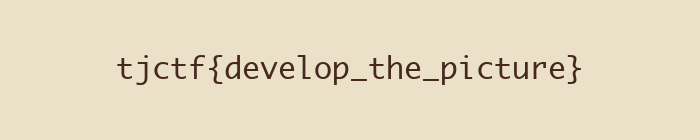
Flag
tjctf{develop_the_picture}Key Takeaways
| Concept | Notes |
|---|---|
| Byte-by-byte password check | Immediate ASCII comparisons in ARM64 disassembly are easy to read sequentially |
| Repeating-key XOR | Applying the same key to ciphertext reverses the encryption without running the binary |
| Image orientation | A valid-but-inverted PNG is still a valid PNG — always open the output before giving up |